
Withings Body Smart Review: A Smart Scale That Plays Well With Apple Health

Withings Body Smart review: body composition, Wi-Fi and Bluetooth sync, Apple Health and Google Fit support, 'Eyes Closed' mode, limits and who it suits.
This article may contain affiliate links. If you buy through them, we may earn a small commission at no extra cost to you. Learn more.
Disclosure: Lilac Reviews is reader-supported. As an Amazon Associate we earn from qualifying purchases, at no extra cost to you. We don’t list prices because they change often; check Amazon for the current price.
Withings has been making connected scales for more than a decade, and the Withings Body Smart is its mid-range model: more metrics than a basic weight scale, Wi-Fi sync so you never open an app to save a reading, and support for most of the big health apps.
In this Withings Body Smart review we cover what it measures, how syncing works, what owners like and dislike, and how it compares with cheaper smart scales.
The short version
The Body Smart is a polished, easy-to-live-with smart scale. Wi-Fi sync, multi-user support and good app integrations are its strengths. Like all home scales, its body composition numbers are estimates, and you pay more than for budget Bluetooth scales.

How we put this review together
We have not lab-tested the Body Smart. This review is based on Withings’ published specs and help pages, comparison with similar scales, and recurring themes in owner reviews. Check the listing for the current model and its exact features.
What it measures
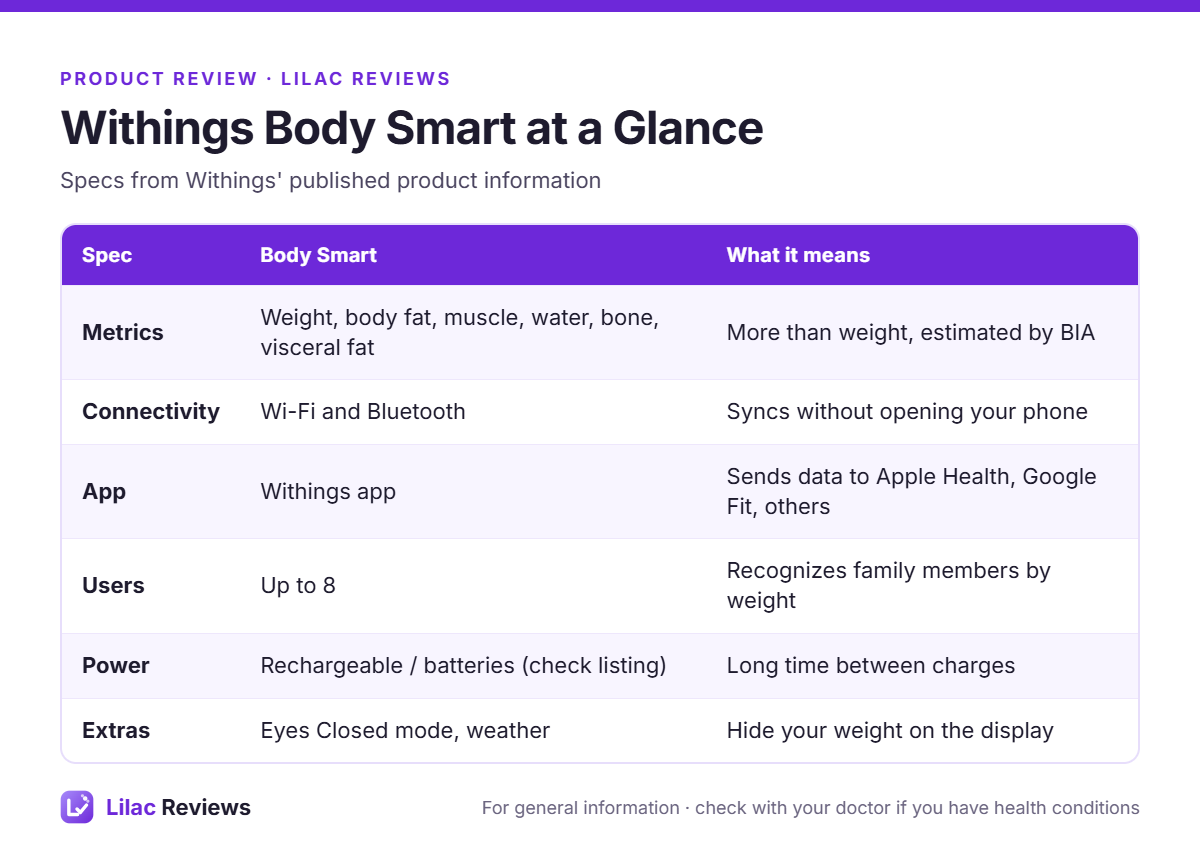
Besides weight, the Body Smart estimates body fat percentage, muscle mass, water percentage, bone mass and visceral fat using bioelectrical impedance (BIA). Withings also shows a body composition trend in its app. As we explain in how accurate are smart scales, these numbers are estimates that move with hydration; the trend over weeks is what’s useful.
What we like
Wi-Fi sync
Step on, step off, done. Readings upload over Wi-Fi without your phone. Bluetooth is there as a backup. This is one of the main reasons to choose Withings over budget scales that need the app open.
Plays well with other apps
The Withings app (formerly Health Mate) can share data with Apple Health, Google Fit and many fitness apps. If you track workouts in one place, your weight trend can live there too.
Multiple users
The scale recognizes several household members by weight, so a couple or family can share one scale with separate accounts.
Eyes Closed mode
You can hide your weight on the display and see trends in the app instead. People who find a daily number stressful appreciate this.
Clear display
The screen shows your metrics plus extras like the weather, which sounds silly but is handy in the morning.
What could be better
- Price: more than budget scales like the RENPHO Elis 1 that show similar metrics.
- Setup: Wi-Fi setup trips up some owners, especially on 5 GHz-only networks. Make sure your router offers 2.4 GHz.
- Optional subscription: some advanced Withings features sit behind Withings+.
- Foot-only BIA: like all foot-to-foot scales, upper-body composition is largely estimated.
Body Smart vs alternatives
vs RENPHO Elis 1
RENPHO costs far less and syncs with major apps over Bluetooth. Withings adds Wi-Fi, better build and a more polished app. Our RENPHO Elis 1 review covers that scale.

vs Garmin Index S2
If you wear a Garmin, the Index S2 puts weight straight into Garmin Connect. Otherwise Withings has wider app support.
For more options, see our best smart scales guide.
Who should buy the Withings Body Smart
- iPhone users who want weight and body fat trends in Apple Health with zero effort.
- Households sharing one scale.
- Anyone who wants a scale that “just syncs”.
Who should skip it
- Budget buyers who don’t mind opening an app: a Bluetooth scale is fine.
- People with pacemakers or other implanted electronic devices: BIA isn’t for you; use weight-only mode and ask your doctor.
Tips for better readings
- Weigh in the morning before eating or drinking.
- Use bare, dry feet on a hard floor.
- Keep the scale in the same spot.
- Look at the weekly trend in the app.
Combine it with a monthly tape measure and photos, as we suggest in how to track workout progress.
Setting it up the right way
- Download the Withings app and create your profile with accurate height, age and sex.
- Connect the scale to a 2.4 GHz Wi-Fi network during setup.
- Add family members as separate users so readings don’t get mixed up.
- Turn on Apple Health or Google Fit sharing in the app settings and choose which metrics to send.
- Place the scale on a hard, flat floor where it can stay.
If two people in the house weigh within a few pounds of each other, the scale may ask who stepped on. Confirm it in the app the first few times and it gets better at telling you apart.
FAQ
Does the Withings Body Smart work with Apple Health?
Yes, through the Withings app.
Does it need Wi-Fi?
No, it also works over Bluetooth, but Wi-Fi makes syncing automatic.
Is the Withings Body Smart accurate?
Weight is accurate. Body composition numbers are estimates, best used for trends.
How many people can use it?
Several users; check the listing for the current limit.
Bottom line
The Withings Body Smart is a smart scale you set up once and then forget about, which is exactly what most people want. If budget matters more than convenience, a Bluetooth scale like the RENPHO is fine.
This article is for general information and is not medical advice.
This guide is for general information only and is not medical advice. Talk to a qualified professional before starting a new exercise program, especially if you have an injury or health condition.