
Fitness Tracker vs Smartwatch: Which Do You Need for Workouts?

Fitness tracker vs smartwatch compared on battery, screen, accuracy, apps, safety features and cost, with clear picks for beginners, seniors and gym users.
This article may contain affiliate links. If you buy through them, we may earn a small commission at no extra cost to you. Learn more.
Disclosure: Lilac Reviews is reader-supported. As an Amazon Associate we earn from qualifying purchases, at no extra cost to you. We don’t list prices because they change often; check Amazon for the current price.
Fitness trackers and smartwatches have grown so close that it’s easy to wonder why both still exist. They share many of the same sensors: heart rate, motion, often GPS. The real difference is what each one puts first. A tracker focuses on health and battery life. A smartwatch is a small computer on your wrist that also tracks workouts.
Here’s how a fitness tracker vs smartwatch compare for workouts and everyday health, and which one fits beginners, seniors and regular gym-goers.
The short answer
- Get a fitness tracker if you want steps, heart rate and sleep with a week-long battery, a light band you can sleep in and a lower price.
- Get a smartwatch if you want apps, maps, payments, calls and messages, a bigger screen and safety features like fall detection, and you don’t mind charging every day or two.
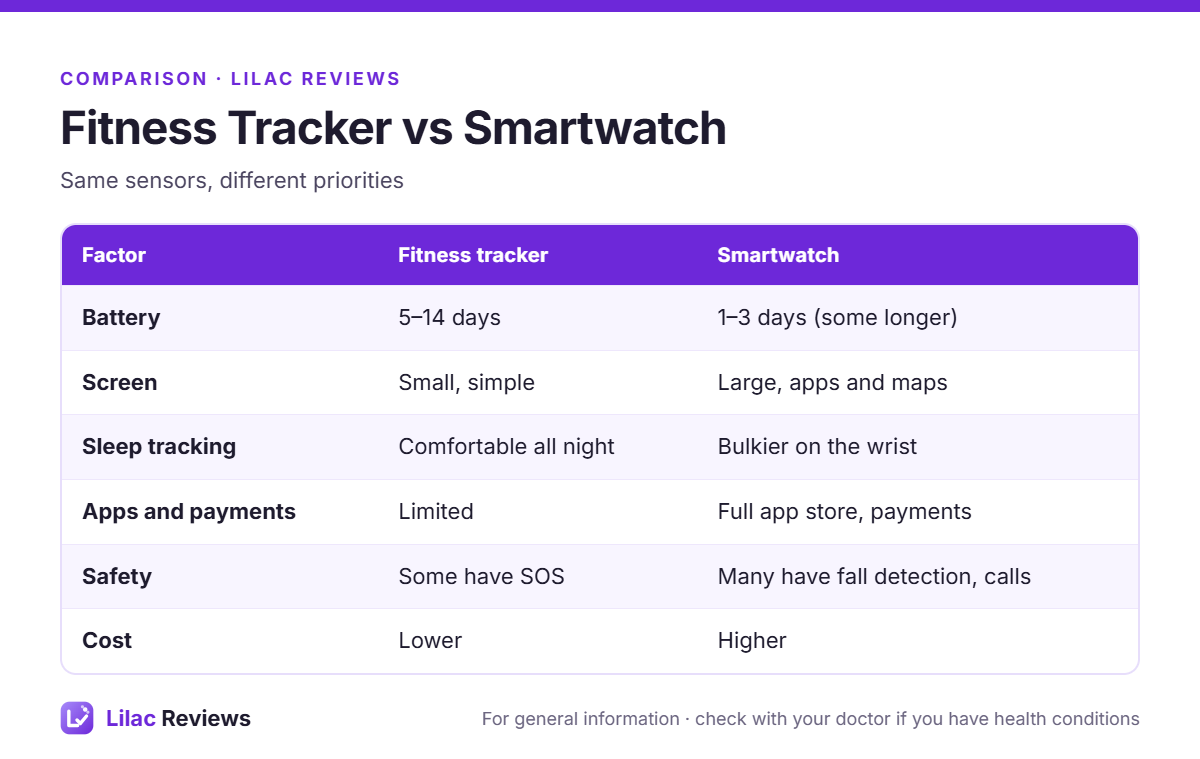
Side-by-side: what’s really different
Battery life
This is the biggest everyday difference. Trackers like the Fitbit Charge 6 and Garmin Vivosmart 5 run for around a week. Many smartwatches need charging daily or every couple of days. Some sport-focused watches last longer, but they cost more.
Screen and size
Trackers have slim, simple screens. Smartwatches have large, bright displays that are easier to read and can show maps, workouts and messages. If eyesight is an issue, a bigger screen can matter more than battery.
Sleep tracking
Both track sleep, but people are more likely to wear a light band overnight. A bulky watch is more noticeable in bed. If sleep is your main interest, also look at smart rings.
Workout tracking
For walking, running, cycling and gym workouts, both do the basics. Smartwatches usually offer more workout types, on-screen guided workouts and better GPS. For lifting, neither is great at counting reps automatically. For accurate heart rate in any device, pair a chest strap.
Apps, payments and phone features
Smartwatches win clearly: apps, music, contactless payments, voice assistants, replies to messages and, on some models, calls without your phone (LTE versions).
Safety features
Fall detection and emergency SOS are mostly found on smartwatches like the Apple Watch, some Samsung and some Garmin watches. That’s a real reason for older adults living alone to choose a watch.
Cost
Trackers cost less, and some brands charge an optional subscription for extra insights either way.
Which one for you?
Beginners starting to exercise
A fitness tracker. It nudges you to move, shows your active minutes and doesn’t need much attention. Our tracker pick is below.
Seniors
Depends on your priority. For simplicity and battery, a tracker. For fall detection and a large screen, a smartwatch. Our best fitness trackers for seniors guide covers both.
Runners and cyclists
A smartwatch or a dedicated sports watch, for better GPS, maps and training features.
Gym and home gym users
Either works. A tracker plus a chest strap gives great heart rate data for less money. A smartwatch adds guided workouts and music.
Good examples of each
Fitness tracker: Fitbit Charge 6
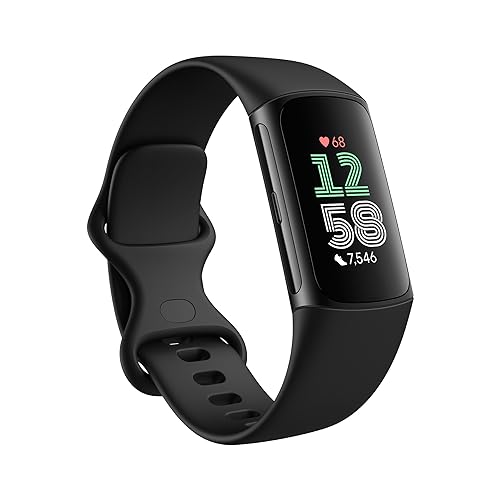
About a week of battery, built-in GPS, bright screen and a simple app.
Fitness tracker with no subscription: Garmin Vivosmart 5
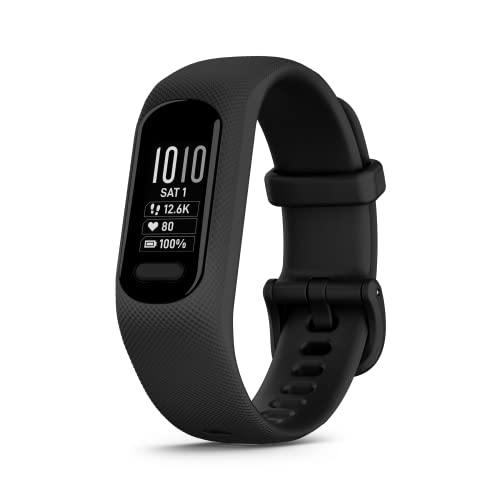
Physical button, up to 7 days of battery and everything free in Garmin Connect.
Smartwatch: Apple Watch SE

Fall detection, emergency SOS, a big screen and the full Apple app store (iPhone only).
Questions to ask yourself before buying
- Will I charge it every night? If the honest answer is no, a tracker with a week-long battery will serve you better than a watch that dies on day two.
- Do I want fewer notifications or more? Some people buy a tracker precisely to get away from their phone. Others want replies and calls on their wrist.
- What phone do I use? Apple Watch needs an iPhone. Fitbit, Garmin and Amazfit work with both iPhone and Android.
- Is safety a priority? If you live alone or have had a fall, a watch with fall detection is worth the extra charging.
- What will I actually look at? If it’s steps, sleep and heart rate, a tracker covers it. If it’s maps, music and apps, it’s a watch.
Whichever you choose, the device works best as a reminder, not a judge. Use the data to notice patterns, like sleeping worse after late workouts or walking less on busy days, and adjust from there. Our guide to tracking workout progress shows how to keep it simple.
FAQ
Is a smartwatch better than a fitness tracker for workouts?
For running and cycling with GPS and maps, usually yes. For general fitness, steps and sleep, a tracker is just as good and lasts longer between charges.
Are fitness trackers accurate?
Steps and resting heart rate are generally good. Calories and heart rate during intense intervals are less accurate. Treat them as estimates.
Can a fitness tracker replace a smartwatch?
For health tracking, yes. For apps, payments, calls and safety features, no.
Do I need a subscription?
Some brands, like Fitbit, offer optional subscriptions with extra insights. Garmin’s features are free. Check before you buy.
Bottom line
If you mostly want to move more and sleep better, a fitness tracker is simpler and lasts longer. If you want a phone on your wrist with safety features, get a smartwatch. Neither will make you fitter on its own, but either can help you notice your habits.
This article is for general information and is not medical advice.
This guide is for general information only and is not medical advice. Talk to a qualified professional before starting a new exercise program, especially if you have an injury or health condition.