
Best Fitness Trackers for Seniors (Easy Screens, Long Battery, Safety Features)

The best fitness trackers for seniors: big readable screens, simple apps, week-long battery and fall detection options, with tips for setup and comfort.
This article may contain affiliate links. If you buy through them, we may earn a small commission at no extra cost to you. Learn more.
Disclosure: Lilac Reviews is reader-supported. As an Amazon Associate we earn from qualifying purchases, at no extra cost to you. We don’t list prices because they change often; check Amazon for the current price.
A fitness tracker can be a great nudge to walk a little more, sleep a little better and keep an eye on your heart rate. But many trackers are designed for 25-year-old runners: tiny text, endless swiping and a battery that dies every night. For older adults, the best tracker is the one you can read without your glasses and forget about charging for a week.
This guide covers the best fitness trackers for seniors, with a focus on readable screens, simple apps, long battery life and safety features like fall detection. We also explain how to set one up so it’s helpful instead of annoying.
Quick picks
- Best overall: Fitbit Charge 6, easy app, built-in GPS, about a week of battery.
- Best for simplicity: Garmin Vivosmart 5, physical button and no subscription.
- Best budget Fitbit: Fitbit Inspire 3, small, light and long battery.
- Best for safety features: Apple Watch SE, fall detection and emergency calls (iPhone users).
- Best big screen on a budget: Amazfit Band 7.
How we chose
We compared published specs and features from each brand, read through owner feedback from older buyers in particular (screen readability, clasp, app setup), and checked guidance on activity for older adults from the CDC. We have not lab-tested these devices.
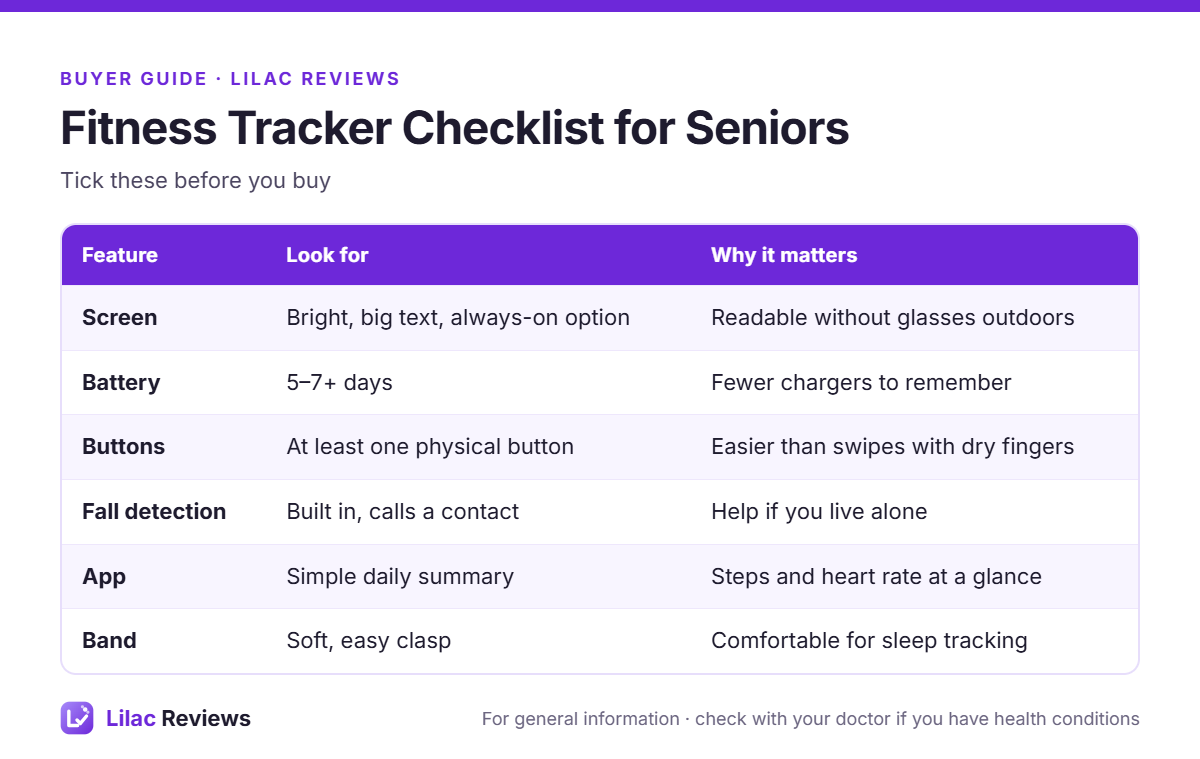
What seniors should look for in a fitness tracker
A screen you can actually read
Look for a bright AMOLED or OLED display and the option to make the clock or step count large. Outdoors, a dim screen is frustrating. If you wear reading glasses, try to see the device in a store or check photos of the screen in owner reviews.
Battery that lasts
Smartwatches that need charging every night are easy to forget. A five to seven day battery means you charge it on the same day each week, for example every Sunday morning. It also means the tracker stays on overnight to track sleep.
Buttons, not just swipes
Touchscreens can be fiddly with dry or cold fingers. A physical button to wake the screen and go “back” makes a big difference for many people.
Safety features
Fall detection, which can call an emergency contact if you fall and don’t respond, is mostly found on smartwatches like the Apple Watch and some Samsung and Garmin watches. Most slim fitness bands do not have it. If you live alone and safety is your top reason for buying, put this first.
An app that keeps things simple
You want a daily summary: steps, active minutes, heart rate and sleep. Fitbit and Garmin both do this well. Family members can help with setup, but the day-to-day should be easy.
The best fitness trackers for seniors
1. Fitbit Charge 6: best overall
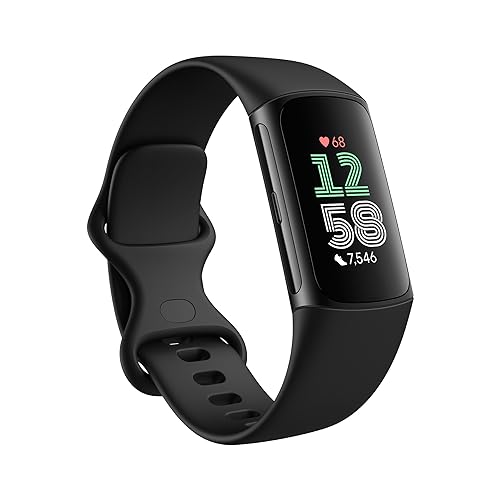
The Charge 6 is our top pick because it balances everything: a bright color screen, a side button that’s easy to find, about a week of battery, built-in GPS for walks without your phone, and the friendly Fitbit app. It can also send heart rate to some gym machines and apps. Our full Fitbit Charge 6 review goes into detail.
Good to know: some deeper insights sit behind the Fitbit Premium subscription. The free version covers what most people need. It also needs a Google account.
2. Garmin Vivosmart 5: best for simplicity
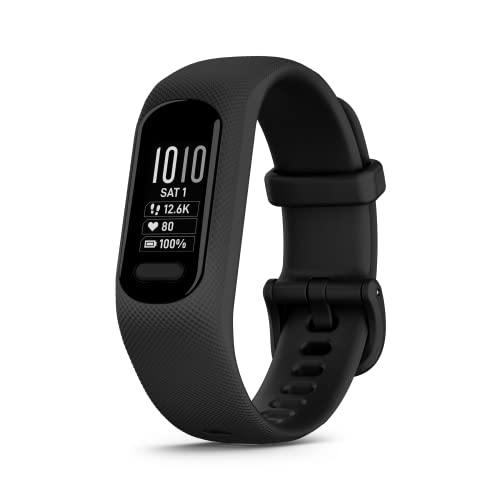
The Vivosmart 5 has a larger screen than its predecessor and a real button, which is a big plus. Battery is up to about a week, and there’s no subscription: everything is in the free Garmin Connect app. Garmin’s “Body Battery” score is a nice simple way to see whether you’ve rested enough.
Good to know: the screen is monochrome and there’s no built-in GPS, so bring your phone if you want maps of your walks.
3. Fitbit Inspire 3: best budget pick

The Inspire 3 is small, light and comfortable for sleeping, with a color screen and battery life of up to around 10 days. It tracks steps, heart rate, sleep and active minutes, and it reminds you to move each hour. For many seniors that’s all a tracker needs to do.
Good to know: the screen is small. If your eyesight isn’t great, the Charge 6 or a smartwatch will be easier.
4. Apple Watch SE: best for safety features

If you use an iPhone and fall detection matters most, the Apple Watch SE is the easiest way to get it. It can detect a hard fall, ask if you’re OK and call emergency services if you don’t respond. Emergency SOS, a large clear screen and Apple’s activity rings round it out.
Good to know: it needs charging every day or so and only works with iPhone. It’s more of a smartwatch than a fitness band, so read our fitness tracker vs smartwatch comparison if you’re torn.
5. Amazfit Band 7: best big screen on a budget
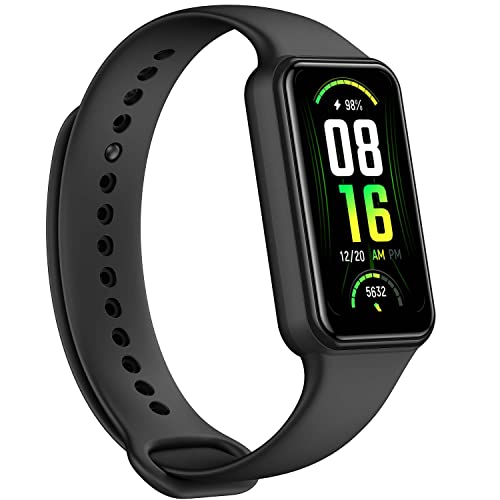
The Amazfit Band 7 has a surprisingly large screen for a band, long battery life and an always-on display option. The Zepp app is not as polished as Fitbit’s or Garmin’s, but there’s no subscription needed for the basics.
Good to know: the app has a lot of menus; a family member may need to help set it up.
Setting up a tracker so it actually helps
- Make the text bigger. Choose a clock face with large numbers and only one or two stats.
- Set a realistic step goal. Start near your current average and add 500 to 1,000 steps a week. 10,000 is not a magic number.
- Turn off notifications you don’t need. A buzzing wrist all day gets old fast.
- Add an emergency contact if the device supports SOS or fall detection.
- Pick a charging day and keep the charger in the same spot.
The CDC recommends that adults 65 and older get about 150 minutes of moderate activity a week, plus muscle-strengthening on two days and balance activities. A tracker’s “active minutes” count is a simple way to see how close you are. If you’re looking for ideas, our easy home exercises for seniors and low-impact elliptical workouts are good places to start.
A note on heart rate readings
Wrist trackers are good at resting heart rate and steady walking, but less accurate during fast changes, such as intervals. They are not medical devices. If your tracker warns of an irregular rhythm or unusual heart rate, don’t panic, but do talk to your doctor. If you take medicines that slow your heart rate, such as beta blockers, heart rate zones on the tracker may not apply to you.
FAQ
What is the easiest fitness tracker for seniors to use?
The Fitbit Charge 6 and Garmin Vivosmart 5 are the easiest for most people: simple screens, physical buttons and clear apps.
Do fitness trackers have fall detection?
Most slim bands don’t. Fall detection is mostly found on smartwatches like the Apple Watch, some Samsung Galaxy Watches and some Garmin watches.
Do I need a smartphone for a fitness tracker?
For setup and to see history, yes. Most trackers work with both iPhone and Android, except the Apple Watch, which needs an iPhone.
Are fitness trackers worth it for older adults?
For many people, yes. Seeing your steps and active minutes is a simple daily nudge to move a bit more.
Bottom line
For most seniors the Fitbit Charge 6 is the best all-rounder. Pick the Garmin Vivosmart 5 if you want no subscription and a real button, the Inspire 3 if you want small and affordable, and the Apple Watch SE if fall detection is your top priority and you have an iPhone.
This article is for general information and is not medical advice. Talk to your doctor before starting a new exercise program, especially if you have heart conditions.
This guide is for general information only and is not medical advice. Talk to a qualified professional before starting a new exercise program, especially if you have an injury or health condition.